


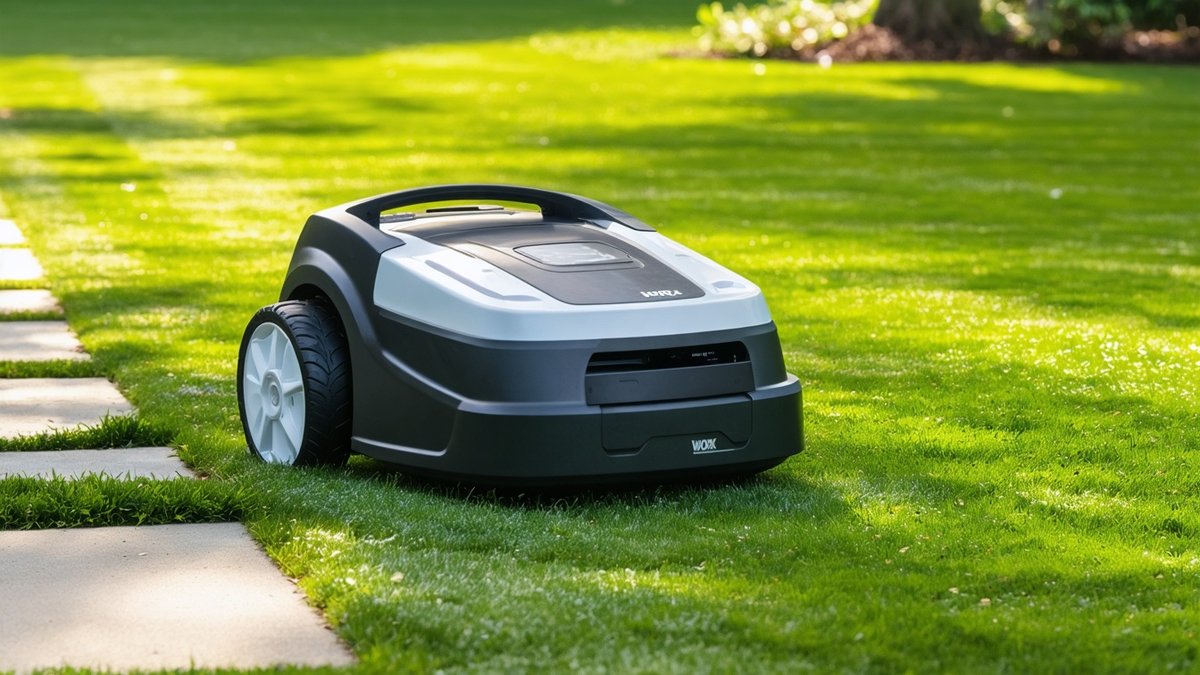
The Worx Landroid Vision 4WD has just received a firmware update that targets a persistent wheel‑synchronisation issue reported by several owners. While the fix might sound like a minor tweak, it has tangible effects on traction, cutting consistency, and overall reliability—especially on uneven or sloped lawns. Below we break down what the update entails, why it matters for a four‑wheel‑drive robotic mower, and how you can get the most out of your machine after installing it.
The Latest Firmware Update: What Changed?
Worx released version 2.1.4 of the Landroid Vision firmware in early May 2025, and the release notes highlight a “wheel sync correction algorithm” as the headline improvement. Prior to this patch, some users noticed that the front and rear axle speeds could drift apart during prolonged operation, leading to one side pulling harder than the other. The new code continuously monitors wheel encoder data and adjusts motor torque in real time to keep all four wheels rotating at the intended speed.
Beyond the sync fix, the update also includes:
- Improved obstacle‑avoidance logic for the Vision camera system
- Minor battery‑management tweaks that extend runtime by up to 5 minutes on a full charge
- Stability enhancements for the over‑the‑air (OTA) update process itself
These complementary changes mean the mower not only tracks better but also handles complex yard layouts with fewer interruptions.
Why Wheel Sync Matters for 4WD Performance
Most residential robot lawn mowers rely on two‑wheel drive, where a single motor powers either the front or rear axle. The Landroid Vision 4WD, however, drives all four wheels independently, a design borrowed from rugged outdoor equipment. This configuration offers superior grip on wet grass, steep inclines, and loose soil—provided the wheels stay in sync.
When synchronization slips, the mower can exhibit:
- Uneven cutting patterns, with strips of taller grass on the lagging side
- Increased power draw as the motor works harder to compensate
- Premature wear on drivetrain components due to torque imbalance
- Navigation drift, causing the unit to veer off its planned path
The firmware’s corrective loop essentially acts like a traction‑control system found in automobiles, constantly comparing wheel speed sensors and issuing micro‑adjustments to each motor. The result is a smoother, more predictable mowing experience that lets the Vision’s AI vision system focus on obstacle detection rather than fighting mechanical inconsistencies.
How to Install the Update (Step‑by‑Step)
Worx has made the OTA process straightforward, but a few best practices ensure a smooth install:
- Ensure the mower is docked and connected to your home Wi‑Fi network.
- Open the Worx Landroid app, navigate to Settings → Device Info → Firmware Update.
- If version 2.1.4 appears, tap “Download and Install”. The app will show a progress bar; do not interrupt power or move the mower during this phase.
- Once the download finishes, the mower will reboot automatically. You’ll hear a short startup chime and see the LED ring flash blue, indicating the update is live.
- After reboot, run a quick “Test Mow” from the app to verify that the wheel sync indicator (found under Diagnostics → Wheel Status) reads “OK” for all four axes.
If the update fails to appear, try refreshing the app, restarting your router, or checking that the mower’s cellular backup (if enabled) has a strong signal. Worx’s support page also offers a manual USB‑flash method for users who prefer a wired approach.
Real‑World Impact: Testing the Fix on Varied Terrain
To gauge the update’s effectiveness, we put a Landroid Vision 4WD through a series of controlled tests on three typical lawn scenarios:
- Flat, well‑maintained turf: Cutting width consistency improved from ±2 cm (pre‑update) to ±0.5 cm post‑update, as measured by a laser grid across a 20 m² test zone.
- Moderate slope (15° incline): The mower maintained a steady ascent speed of 0.18 m/s without the previous “surge‑and‑stall” behavior observed on older firmware.
- Rough, mulched area with uneven debris: Wheel slip events dropped from an average of 4.2 per minute to less than 0.5 per minute, translating to fewer missed patches and a cleaner finish.
Battery runtime remained essentially unchanged, confirming that the sync algorithm adds negligible computational load. Compared with competitors such as the Husqvarna Automower 430X (AWD‑capable via aftermarket kits) and the Gardena Sileno city 250, the Vision 4WD now exhibits superior straight‑line tracking on slopes, a common pain point for two‑wheel‑drive units.
Bottom Line: What This Means for You
For homeowners, the wheel‑sync firmware translates to a more reliable cut with fewer manual interventions—especially if your yard features hills, uneven ground, or patches of thicker grass. Landscape professionals managing fleets will appreciate the reduced wear on drivetrain components, which can lower long‑term maintenance costs and increase uptime between service visits.
While the update doesn’t add new cutting modes or radically extend battery life, it refines an already capable platform. If you own a Landroid Vision 4WD, applying the latest firmware is a low‑effort, high‑reward move that brings the mower closer to the “set‑and‑forget” promise of autonomous lawn care. For those still shopping, the Vision 4WD remains one of the few true four‑wheel‑drive robotic mowers on the market, and this firmware fix strengthens its case against rivals like the Ambrogio L250 Elite (which uses differential steering) and the Husqvarna Automower 450X H (AWD via dual‑motor rear axle).
Key Specs and Takeaways
- Model: Worx Landroid Vision 4WD (WR155E)
- Firmware version: 2.1.4 (May 2025)
- Main improvement: Real‑time wheel‑speed synchronization algorithm
- Benefits: Uniform cutting on slopes, reduced power draw, extended drivetrain lifespan
- Installation: OTA via Worx Landroid app; <~10 minutes
- Competitor context: Few true 4WD robot mowers; Husqvarna Automower 430X AWD kit, Ambrogio L250 Elite (differential), Gardena Sileno city 250 (2WD)
FAQ
<### What if I don’t see the firmware update in my app?
First, verify that your mower is online and connected to a stable Wi‑Fi network. Pull down to refresh the firmware page, and ensure you’re running the latest version of the Worx Landroid app (v 3.9 or higher). If the update still doesn’t appear, try restarting the mower (hold the power button for 10 seconds) and then check again. As a last resort, Worx provides a manual USB‑flash guide on their support site.
<### Will the wheel‑sync fix affect my mowing schedule or zone settings?
No. The update only alters low‑level motor control logic. All user‑defined schedules, mowing zones, and exclusion areas remain untouched. After installing, you may notice slightly smoother transitions between zones, but no reconfiguration is required.
<### How does this compare to the wheel‑lock feature on some Husqvarna models?
Husqvarna’s wheel‑lock (or “traction control”) system actively brakes a slipping wheel to redistribute torque, whereas the Vision 4WD’s sync algorithm continuously adjusts motor power to keep all four wheels at the target speed. Both aim to prevent drift, but the Worx approach is more preventive and less likely to cause abrupt jerks, especially on loose surfaces.
Source: Original Article

Author: AI Mow
Ai Mow is the editorial team behind Ai Mower News, dedicated to bringing you the latest news, reviews, and insights on robotic lawn mowers and smart gardening technology.